
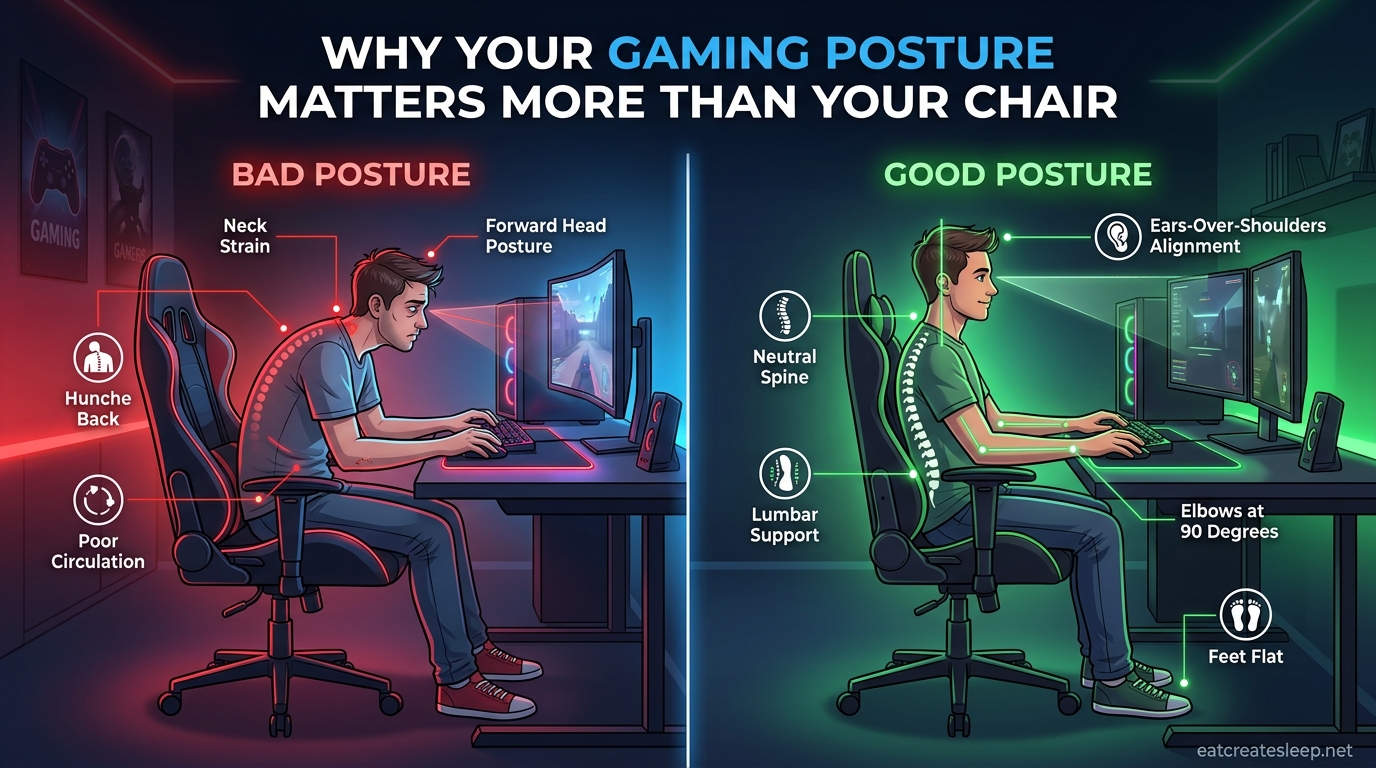
I spent three years chasing the perfect gaming chair. I tried a “racing-style” bucket seat, a high-end ergonomic task chair, even a stool with no back support. None of them fixed the dull ache that crept up my neck after a two-hour ranked session. The fix, when it finally came, cost me nothing. I just started sitting differently.
That experience is why I want to talk about gaming posture as a concept that lives independently from whatever chair you own. Gamers spend an average of $300 to $500 chasing the right seat, then sit in it badly for six hours a night. The chair is a tool. Posture is the skill that actually decides whether you finish a session feeling loose or reaching for ibuprofen. This guide breaks down why posture matters more than your chair, what bad posture is doing to you right now, and how to fix it without spending another dollar.
Table of Contents
Why Gaming Posture Matters More Than Your Chair?
A chair supports you, but it cannot position you. Even the most adjustable, breathable, lumbar-loaded seat on the market becomes a problem the moment you slump into a forward head position or rest your wrists at the wrong height. I have watched friends drop $600 on a chair, only to spend every session curled sideways with one foot tucked under their opposite knee.
Your gaming posture is the sum of every joint angle your body holds during play: the curve of your spine, the drop of your shoulders, the bend of your elbows, the placement of your feet. Those angles decide how much load lands on your muscles, how freely your blood circulates, and how much strain builds in your nerves. A $1,200 chair cannot undo a forward head tilt that adds up to 40 extra pounds of force on your cervical spine.
The reason posture wins over equipment comes down to time. Gamers sit for hours. Holding any position, even a slightly off one, for that long turns small misalignments into real damage. The chair sets the ceiling for how good your posture can be. Your habits decide whether you actually reach it.
The Chair Sets the Ceiling, Posture Decides If You Reach It
Think of a chair like a good pair of running shoes. They make proper form possible, but they cannot run for you. A chair with adjustable seat height, lumbar support, and armrests gives you the tools to sit well. Whether you actually use those tools every minute of a four-hour raid is a posture decision, not a furniture decision.
You Can Build Great Posture on a Cheap Chair
I have sat in a $40 dining chair with a rolled-up towel for lumbar support and ended a session feeling better than I did in a name-brand gaming throne. A footrest made of stacked books, a monitor raised on a shoebox, and a folded blanket under the wrists can transform a mediocre setup. The hardware matters far less than the angles you commit to holding.
What Bad Gaming Posture Actually Does to Your Body
Poor posture is not just uncomfortable. Over weeks and months of long sessions, it produces real, measurable damage that most gamers dismiss as “just part of gaming.” It is not. Here is what is happening while you slouch.
Neck and Upper Back
Every inch your head drifts forward of your shoulders adds roughly 10 pounds of effective load to your cervical spine. A neutral head weighs about 12 pounds. Craned forward toward a monitor, it can load your neck like a 42-pound weight. That is why so many gamers report a stiff neck after just an hour of play and a dull headache starting at the base of the skull.
Lower Back
When you slouch, your lumbar lordosis, the natural inward curve of your lower spine, flattens or reverses. The load that your spinal discs and core muscles were designed to share gets dumped onto ligaments and the posterior edges of your intervertebral discs. Over months this pattern is linked to lower back pain, disc bulging, and chronic stiffness that does not go away after the session ends.
Wrists and Forearms
Resting your wrists on the desk edge while reaching for a mouse compresses the carpal tunnel and forces your forearm muscles to work from a kinked angle. Gamers often feel this as wrist fatigue, forearm tightness, or a tingling sensation that flares during intense matches. Left unchecked, this is the pathway to repetitive strain injury (RSI) and carpal tunnel syndrome.
Shoulders and Hips
Hunched shoulders tighten the upper trapezius and weaken the muscles that should hold your shoulder blades back. Crossed legs or a seat that is too high compresses the hip flexors and limits blood flow to your legs. Both patterns produce that heavy, drained feeling after a session even when the game itself was not that intense.
How Posture Affects Gaming Performance
This is the part most guides skip, and it is the angle that matters most if you care about winning. Posture is not just a health play. It is a performance play.
When your spine is stacked in a neutral position, blood flows freely to your brain and your muscles do not have to constantly compensate for imbalance. That means more oxygen, less fatigue, and a longer window before your reaction time starts to slip. Compressed, slouched positions restrict breathing, reduce circulation, and accelerate the muscle fatigue that quietly slows your aim and decision-making in the third hour of a session.
Esports organizations now employ ergonomics coaches for the same reason they employ nutritionists and sports psychologists. A player who can hold a focused, neutral position for five hours has a real mechanical advantage over one who starts the night comfortable and ends it slouched sideways with a sore neck. If you want to climb ranks, your posture is part of your loadout.
I noticed this myself the first time I rebuilt my setup around posture rather than gear. My K/D ratios in long sessions stopped cratering after hour three. My aim felt steadier. The difference was not a new mouse or monitor. It was that I could finally sit the same way at hour four as I did at hour one.
Common Gaming Posture Mistakes
Before we get to the fixes, let us name the patterns that quietly wreck most setups. If you recognize yourself in any of these, you are not alone. Every gamer I know has done at least three of them.
1. The Forward Head Tilt
You lean your head toward the monitor without realizing it, especially during intense fights. Your neck pays the bill. Fix: position the monitor so the top edge sits at or just below eye level, about an arm’s length away.
2. The Slouched Lower Back
Your hips slide forward, your lower back rounds against the seat, and your spine takes on a C shape. Fix: sit all the way back in the seat so the backrest actually contacts your lower back, and use lumbar support if the chair has it.
3. The Raised Shoulders
Your desk or armrests are too high, so your shoulders creep up toward your ears. Within 30 minutes your upper traps are burning. Fix: drop the chair or desk so your elbows rest at roughly 90 degrees with shoulders relaxed.
4. The Crossed Legs or Tucked Foot
You fold one leg under the opposite knee or cross your ankles. This twists your pelvis and limits circulation. Fix: keep both feet flat on the floor (or on a footrest) with knees at about 90 degrees.
5. The Desk-Edge Wrists
You plant your wrists on the sharp front edge of the desk and reach outward for the mouse. Fix: float your wrists or use a wrist rest, and position the mouse close enough that your forearm stays roughly parallel to your body.
6. The Leaning-Back Reclined Slouch
You crank the chair recline back and end up craning your neck forward to see the screen, which combines two problems into one. Fix: keep the backrest between 90 and 110 degrees and move the monitor to match your head position, not the other way around.
How to Set Up Proper Gaming Posture
This is the practical core. Work through these in order, from the ground up. Each adjustment builds on the one before it, so do not skip ahead.
Step 1: Feet and Knees
Plant both feet flat on the floor, shoulder-width apart. Your knees should bend at roughly 90 degrees, with your thighs parallel to the floor. If your feet dangle, your chair is too high. Drop the seat height or add a footrest. If your knees are higher than your hips, the chair is too low and your pelvis is tipping backward.
This is the 90-90-90 rule you will see referenced in ergonomics guides: roughly 90 degrees at the hips, 90 at the knees, 90 at the ankles. It is a starting point, not gospel, but it works for most bodies.
Step 2: Hips and Lower Back
Sit all the way back so your hips touch the back of the seat. Your lower back should meet the backrest or a lumbar support pillow in its natural inward curve. If there is a gap between your lower back and the chair, fill it with a rolled towel or a purpose-built lumbar cushion.
The goal here is to preserve lumbar lordosis, that inward curve your spine is built to hold. When the curve is supported, the load on your discs drops dramatically.
Step 3: Spine and Shoulders
Stack your spine tall without forcing a military arch. Roll your shoulders up, back, and then let them drop. Your shoulder blades should rest against the backrest, not float forward of it. Imagine a string pulling the crown of your head toward the ceiling.
Step 4: Head and Neck
Bring your head back until your ears line up over your shoulders. Your chin should be level, not tilted up or tucked down. This is the single most important position for preventing the neck pain that ends most sessions early.
Step 5: Arms and Wrists
Let your upper arms hang relaxed at your sides. Bend your elbows to about 90 degrees so your forearms are roughly parallel to the floor and your hands rest on the keyboard and mouse without reaching. Adjust armrest height so they support your forearms just below the elbow without shrugging your shoulders.
Your wrists should stay neutral, not bent up, down, or sideways. A wrist rest can help, but the bigger fix is usually moving your keyboard and mouse closer so you stop reaching.
Step 6: Monitor Placement
Position the monitor about an arm’s length away, roughly 20 to 24 inches. The top edge of the screen should sit at or just below eye level so your gaze falls naturally on the upper third of the display. If you use two monitors, place the primary one directly in front of you and angle the second so you turn your whole torso, not just your neck.
For controller-based console gaming on a TV, the same principles apply. The screen should sit at eye level when you are seated in your normal play position, and you should not have to crane your neck up or down for long stretches.
Habits That Protect Your Posture During Long Sessions
The setup above is the easy part. The hard part is holding it. Here are the habits that separate gamers who finish a session loose from those who finish it sore.
Reset Every 30 Minutes
Posture drifts. After 30 minutes of intense gameplay, you will almost certainly be slouched, hunched, or leaning without realizing it. Set a quiet timer. When it fires, do a five-second reset: feet flat, shoulders back, head stacked over hips. Then keep playing.
The 20-20-20 Rule for Your Eyes
Every 20 minutes, look at something 20 feet away for 20 seconds. This is not strictly a posture fix, but eye strain causes you to lean in toward the screen, which cascades into neck and shoulder strain. Resting your eyes protects your whole upper body.
Stand Up Every Hour
No matter how good your seated posture is, sitting in any position for hours restricts circulation and shortens your hip flexors. Stand up at least once per hour for 30 to 60 seconds. Walk to the kitchen, refill your water, stretch your arms overhead. This single habit does more for long-term back health than any chair upgrade.
Quick Stretch Routine
A few stretches between matches go a long way. Try these between games:
Chin tucks: gently pull your chin straight back to flatten the back of your neck. Hold five seconds. Repeat five times.
Doorway chest stretch: stand in a doorway, place your forearms on the frame, and lean forward gently to open your chest and counter the forward-shoulder pattern.
Seated spinal twist: sit tall, twist gently to one side, hold 15 seconds, then switch sides.
Wrist flexor stretch: extend one arm with the palm up, gently pull the fingers back with the other hand, and hold 15 seconds per side.
Strengthen the Muscles That Hold You Up
Posture is not just a sitting skill. It is also a strength skill. The muscles that hold your shoulders back and your spine tall weaken when you spend most of your day in a chair. A few minutes of rows, face pulls, planks, and dead bugs a couple of times a week will make good posture feel easier to hold during long sessions.
Match Hydration to Session Length
Dehydrated muscles fatigue faster and cramp more easily. If you are gaming for hours, keep water next to you and actually drink it. The standing breaks you take to refill your glass double as posture resets.
When to Seek Professional Help
Some discomfort is normal after a long session. Some is not. See a physiotherapist, chiropractor, or doctor if you experience any of the following:
Numbness or tingling in your hands, fingers, or legs that does not go away after you stand up. Sharp or shooting pain in your neck, back, or wrists. Pain that lingers into the next day or worsens over multiple sessions. Headaches that consistently follow gaming sessions.
A professional can identify whether your pain is purely postural or something more, and they can give you a targeted plan instead of generic advice. The gamers I know who took this step early avoided months of frustration.
FAQs
Does posture really matter more than your gaming chair?
Yes. A chair sets the ceiling for how good your posture can be, but your daily sitting habits decide whether you actually reach it. Even a $1,200 chair cannot undo a forward head tilt or slouched lower back. You can build healthy gaming posture on a cheap chair with a towel for lumbar support, but you cannot out-chair bad posture habits.
What is the 90-90-90 rule for gaming posture?
The 90-90-90 rule is an ergonomics guideline for seated posture: roughly 90 degrees at the hips, 90 degrees at the knees, and 90 degrees at the ankles, with feet flat on the floor. It also applies to the elbows, which should bend at about 90 degrees when your hands rest on the keyboard and mouse. Treat it as a starting point rather than a strict rule.
Are gaming chairs better than office chairs for posture?
Not necessarily. Many gaming chairs prioritize racing-style aesthetics over true ergonomic support. A well-adjusted office chair with proper lumbar support, adjustable seat height, and armrests often provides better postural support than a flashy gaming chair. The chair that fits your body and lets you hold a neutral spine is the right choice, regardless of category.
Why do gamers tend to have poor posture?
Gamers develop poor posture because long sessions cause posture drift, intense gameplay pulls attention away from body position, and most setups are not adjusted to the player’s body. Forward head tilt, slouched lower back, raised shoulders, crossed legs, and desk-edge wrists are the most common patterns, and they all stem from sitting too long without resets.
Can good gaming posture actually improve performance?
Yes. Neutral spine alignment keeps blood and oxygen flowing freely, reduces muscle fatigue, and helps maintain reaction time and focus across long sessions. Esports teams now invest in ergonomics coaching for the same reason. A player who holds a focused, neutral position at hour four has a real edge over one who is slouched sideways with a sore neck.
How do I fix bad gaming posture?
Start from the ground up: feet flat, knees at 90 degrees, hips all the way back in the seat with lumbar support, shoulders rolled back and down, head stacked over hips, elbows at 90 degrees, wrists neutral, and the monitor an arm’s length away with the top edge at eye level. Reset every 30 minutes, stand every hour, and stretch between matches.
The Bottom Line on Why Your Gaming Posture Matters More Than Your Chair
If you take one thing from this guide, let it be this: your gaming posture is a skill you practice, not a product you buy. The most expensive chair in the world will not save you if you spend every session slouched, hunched, and craning forward. A cheap chair paired with disciplined sitting habits will beat a luxury chair paired with bad ones every single time.
Start by working through the setup steps in this guide. Then build the habits: reset every 30 minutes, stand every hour, stretch between matches, and pay attention when your body sends warning signals. Your back, your neck, your wrists, and honestly your kill-death ratio will all thank you.
The chair is the tool. You are the player. Posture is the bridge between them, and it is the part you actually control.