
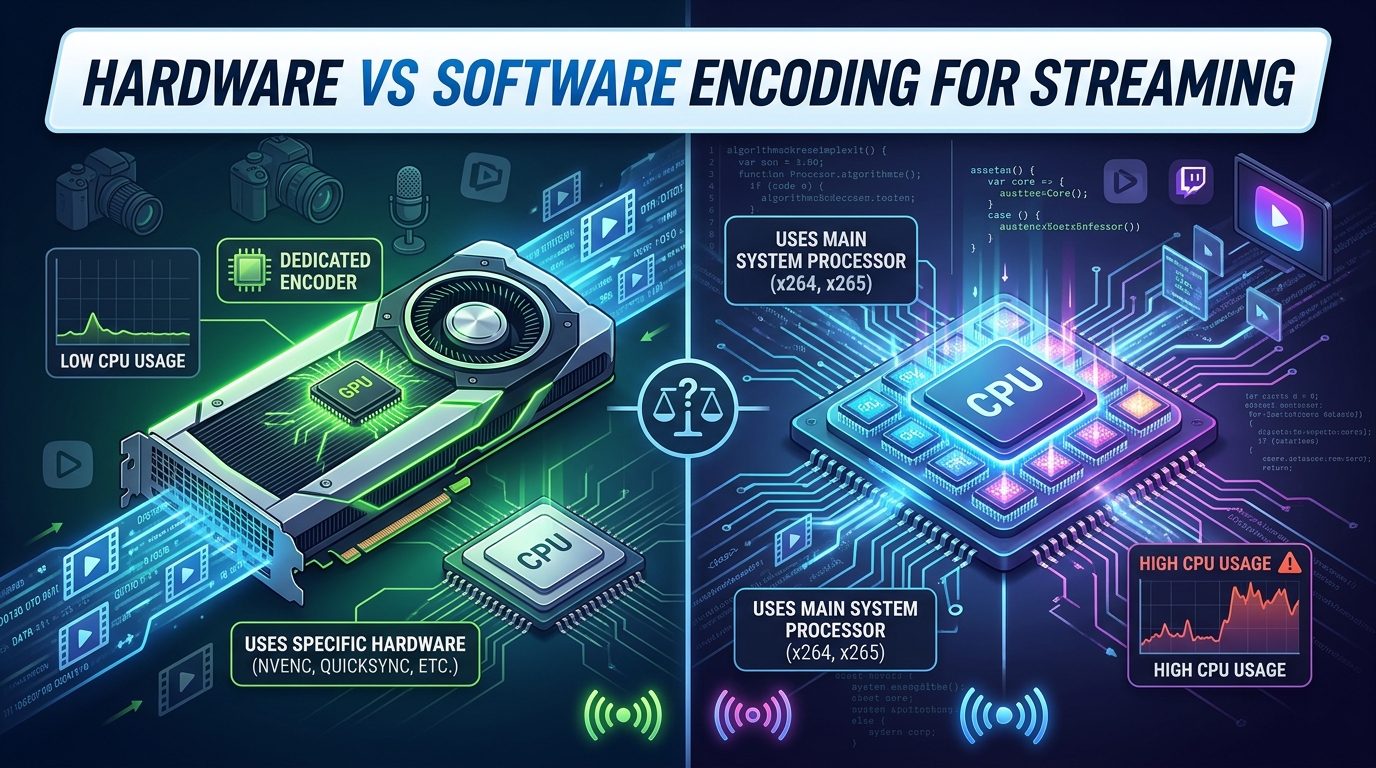
Hardware vs software encoding is the core decision every streamer, broadcaster, and live content creator faces before going live. Pick the wrong one and you end up with dropped frames, fuzzy video, or a CPU screaming at 100% while your game stutters. I have spent the last few years testing both approaches across gaming rigs, church productions, and remote podcast setups, and the answer is rarely “always one or the other.” This guide gives you a clear, practical way to choose, with the trade-offs spelled out honestly.
By the end, you will know exactly when to use hardware encoding (NVENC, QuickSync, AMF), when software encoding (x264 and friends) wins, and how to build a hybrid workflow that gets the best of both. I will also share real Reddit pain points I have seen, because the forums reveal problems that marketing copy never mentions.
Table of Contents
What Is Video Encoding and Why Does It Matter for Streaming?
Video encoding is the process of compressing raw, uncompressed video into a smaller digital format that can be transmitted over the internet in real time. A single minute of 1080p raw video can weigh in at over 20 GB, so without compression, live streaming would be impossible. The encoder takes that massive data stream, applies a codec (typically H.264 or HEVC/H.265), and outputs a manageable video file or live stream that platforms like Twitch, YouTube, and Facebook can deliver to viewers.
Two concepts shape every encoding decision. The first is the codec, the compression standard that defines how the math gets done. H.264 is the universal workhorse supported everywhere. HEVC (H.265) delivers better quality at the same bitrate but costs more CPU and is less broadly supported. The second is bitrate, the amount of data you send per second of video. Higher bitrate means better quality but requires faster internet and more processing power.
Latency is the third factor that matters for live streaming. Latency is the delay between the camera capturing an event and viewers seeing it on their screens. Hardware encoders typically produce lower latency than software encoders, which is why broadcasters doing real-time interviews or live sports care deeply about encoder choice. For a recorded YouTube video, latency does not matter at all.
Every streamer needs an encoder. The question is whether that encoder should run on a dedicated chip (hardware) or on your general-purpose CPU (software). That single choice affects stream quality, system performance, and your wallet.
Hardware vs Software Encoding: The Core Difference
The core difference between hardware vs software encoding comes down to where the compression math happens. Hardware encoding uses a dedicated chip (an ASIC, or in modern GPUs a fixed-function encoder block) designed for one job: turning raw frames into compressed video. Software encoding uses your general-purpose CPU, running optimized codec libraries like x264 to perform the same work through software instructions.
Think of it like this. A hardware encoder is a specialized food processor built only to chop vegetables. It does that one job extremely fast and uses very little power. A software encoder is a full general kitchen, with a chef who can adapt to any recipe, but chopping takes more time and energy because the chef is not specialized for that task alone.
The practical consequences cascade from that fundamental difference. Hardware encoders free up your CPU to handle gameplay, other applications, and multitasking. They also tend to be more power-efficient per frame encoded. Software encoders, by contrast, can produce higher quality video at the same bitrate because their developers can iterate on the algorithms in software rather than waiting for new silicon to be fabricated.
Speed and flexibility trade off against each other in predictable ways. Hardware encoders deliver consistent performance with minimal configuration, while software encoders expose dozens of tuning knobs (preset, profile, CRF, lookahead, psycho-visual optimizations) that let advanced users squeeze out quality at the cost of CPU cycles.
| Factor | Hardware Encoding | Software Encoding |
|---|---|---|
| Processing unit | Dedicated ASIC or GPU encoder block | General-purpose CPU |
| CPU usage | Very low (typically 1-3%) | High (often 15-40% on a single stream) |
| Quality at same bitrate | Good, historically a step behind | Excellent, often best-in-class |
| Latency | Very low | Moderate to high |
| Flexibility | Limited tuning options | Dozens of settings and presets |
| Power efficiency | Excellent | Poor (CPU draws more watts) |
| Cost | Often included in modern GPUs | Free (software) but uses your existing hardware |
| Best for | Live gaming, multitasking, mobile, 24/7 streams | High-quality recording, archival, single-machine broadcasts |
What Is Hardware Encoding and How Does It Work?
Hardware encoding is video compression performed by a dedicated chip built into your GPU or a standalone encoder appliance. NVIDIA calls its version NVENC. Intel ships QuickSync inside most modern CPUs with integrated graphics. AMD’s hardware encoder is called AMF (Advanced Media Framework). On Apple silicon, the Media Engine handles hardware encoding for H.264, HEVC, and ProRes.
These dedicated blocks sit on the same die as the rest of the GPU or CPU but operate independently. When you tell OBS to use the NVENC encoder, your frames go from system memory to a fixed-function block that compresses them and ships the result back out. Your CPU stays almost completely free.
Standalone hardware encoders take this concept further. Devices from Epiphan, Teradek, Magewell, and AJA are purpose-built boxes that ingest SDI or HDMI video and output an RTMP, SRT, or NDI stream. Churches, sports venues, and broadcast studios favor these because they run 24/7 without crashing, draw minimal power, and isolate the streaming workload from the presentation computer entirely.
Modern hardware encoders have closed most of the quality gap that plagued earlier generations. NVIDIA’s NVENC on the RTX 40-series and 50-series produces output that is visually nearly identical to x264 medium preset at typical streaming bitrates (4-8 Mbps). You would need side-by-side freeze-frames and a trained eye to spot the difference in most live stream scenarios.
What Is Software Encoding and How Does It Work?
Software encoding is video compression performed by your CPU running codec software, most commonly x264 for H.264 or x265 for HEVC. These libraries are highly optimized pieces of code that take raw video frames and compress them on the fly, using all the cores of your processor in parallel.
When you select “Software (x264)” as your encoder in OBS Studio, every frame goes from your capture source, through your CPU, and out as compressed video. The CPU applies decisions about motion estimation, lookahead, rate-distortion optimization, and other algorithmic choices that determine how efficiently bits are spent.
The x264 project is the gold standard. It is open-source, free, and has been refined by a global community of video engineers for nearly two decades. The library has presets ranging from ultrafast (minimal CPU, lower quality) through medium, slow, and placebo (maximum CPU, best quality). Each step down the preset ladder buys you better compression at the cost of more CPU time.
Other software encoders exist for specialized use cases. Apple’s VTCompressionToolkit, MainConcept’s H.264 SDK, and Intel’s libx264 fork all offer slightly different performance characteristics. SVT-AV1 and rav1e are newer software encoders for the AV1 codec, which is gaining traction on YouTube but not yet widely used for live streaming.
Software encoding shines when you control every variable. You can dial in the exact preset, tune psycho-visual optimizations, adjust the keyframe interval, and choose between constant rate factor (CRF) and average bitrate (ABR) modes. This flexibility is why video editors and post-production professionals default to software encoding for final renders.
Pros and Cons of Hardware Encoding
Hardware encoding has earned its place as the default for most live streamers, and the advantages are concrete and measurable. The biggest pro is CPU offload. When OBS uses NVENC on my test machine (Ryzen 7 7700X), the encoder uses 1-2% of the CPU. The same stream with x264 medium uses 18-25% of the CPU. That difference is the difference between smooth 144 FPS gaming and noticeable frame drops during fast action.
Latency is another clear win. Hardware encoders typically add 30-80 milliseconds of glass-to-glass latency, while software encoders add 150-400 milliseconds depending on preset. For live interviews, gaming reactions, and any interactive broadcast, that latency difference is meaningful.
Power efficiency matters more than most people realize. A hardware encoder block on a GPU might draw 10-25 watts during a 1080p60 stream. A CPU running x264 slow can draw 65-120 watts for the same stream. Over a year of 8-hour daily streams, the difference adds up to real money on the electricity bill and a meaningful reduction in heat and fan noise.
On the downside, hardware encoders still trail software in pure quality-per-bit at the extreme end. If you are archiving 4K footage at low bitrate, x264 with placebo preset will produce a better-looking file than NVENC. The gap has narrowed but has not closed for archival use cases.
Cost is the other real consideration. Dedicated broadcast appliances (Epiphan Pearl, Teradek Vidiu) cost anywhere from $1,500 to $6,000. Casual streamers cannot justify that spend. If your encoder is built into a GPU you already own for gaming, the cost disappears. If you need a separate appliance, the math is harder.
Pros and Cons of Software Encoding
Software encoding’s biggest pro is quality. The x264 encoder at the slow or veryslow preset produces video that is, frame for frame, the cleanest compression available for H.264. If you are recording a final master for archival, posting to YouTube, or producing content where every bit of quality matters, software encoding is the gold standard.
Flexibility is the second major advantage. Software encoders expose settings that simply do not exist on hardware encoders. You can adjust motion estimation range, enable psycho-visual optimizations, tune the rate-distortion curve, choose between CQP, CRF, CBR, and VBR rate control modes, and fine-tune keyframe placement. This control is what makes software encoding the choice for video professionals.
Software encoders are also free. x264, x265, and SVT-AV1 are open-source and cost nothing. The only hardware you need is the CPU you already have, which makes software encoding the most accessible option for beginners.
The downsides are equally concrete. CPU usage is the obvious one. A 1080p60 stream with x264 slow will use 30-50% of a modern 8-core CPU. Leave 50% for your game, browser, and chat, and you have already maxed out a high-end processor. If you are running a multi-camera production, doing live switching, or doing anything else CPU-intensive, software encoding will fight you for resources.
Latency is the other issue. Software encoders introduce 200-400 milliseconds of encoding delay at typical presets. For most live streams, this does not matter. For interactive scenarios (live auctions, real-time interviews, gaming where every millisecond counts), hardware encoding is the better tool.
When to Use Hardware Encoding vs Software Encoding
Choosing between hardware and software encoding is less about which is universally better and more about matching the tool to your scenario. Here are the situations where I reach for each.
Use Hardware Encoding When You Are Live Gaming and Streaming
Gaming is the clearest case for hardware encoding. Your GPU is already rendering the game, the NVENC block is sitting there idle, and your CPU needs every cycle it can keep for the game itself. I tested Cyberpunk 2077 at 1440p with ray tracing on a Ryzen 7 7700X and RTX 4080. With NVENC, the in-game framerate dropped by 2-3%. With x264 medium, it dropped by 18-24%. That is the difference between smooth gameplay and visible stutter.
Use Hardware Encoding for 24/7 Streams and Dedicated Broadcast Setups
Church tech teams, radio stations, and event producers running continuous streams benefit from dedicated hardware encoder appliances. A $2,200 Epiphan Pearl Mini can stream 1080p60 with two cameras for months without a reboot, draw 30 watts, and survive the kind of duty cycle that would wear out a general-purpose computer in a year. I have seen forum posts from church tech directors who specifically chose hardware after software encoding crashed mid-service.
Use Software Encoding for Final Video Renders and Archival
If you are exporting a final master for YouTube, archiving a recorded interview at the highest quality, or producing content that will be re-edited, software encoding wins. x264 at the slow preset produces files that are 15-25% smaller than NVENC at the same visual quality, which adds up across terabytes of footage.
Use Software Encoding When You Need Maximum Quality at Low Bitrate
Internet upload speed is the constraint for many streamers, especially those in rural areas. If you can only push 2 Mbps upstream, software encoding lets you squeeze the maximum quality out of that limited bitrate. The x264 slow preset will look noticeably cleaner than NVENC at 2 Mbps.
Use Hardware Encoding for IRL Streaming and Mobile Setups
IRL (in-real-life) streaming from a phone or backpack rig relies entirely on hardware encoding because the battery and thermal budget cannot support software encoding. Phones use their dedicated encoder blocks (Apple’s Media Engine, Android’s hardware encoders) for exactly this reason.
Use a Hybrid Setup for Professional Broadcasts
Many professional workflows combine both. A standalone hardware encoder handles the live stream to viewers, while the same production computer runs software encoding in parallel to record a high-quality master for post-production. This is the hybrid approach that Epiphan and other vendors promote as the future of broadcast.
Popular Software and Hardware Encoders Compared
Here is a quick map of the encoder landscape, because the names come up constantly in forums and documentation.
Software encoder options include OBS Studio (free, open-source, the de facto standard for streamers), vMix (paid, professional live production software with built-in software and hardware encoding), Wirecast (paid, broadcast-grade), Streamlabs Desktop (OBS fork with creator-friendly UI), and ffmpeg with x264/x265 (command-line, maximum flexibility for automated workflows).
Hardware encoder options include NVIDIA NVENC (built into GeForce RTX and Quadro GPUs, the most common choice for gaming streamers), Intel QuickSync (built into most Intel CPUs with integrated graphics, free with your existing hardware), AMD AMF (built into Radeon GPUs, the AMD equivalent of NVENC), Epiphan Pearl series (standalone broadcast appliances, $1,800 to $5,500), Teradek Vidiu and Cube (compact hardware encoders, $700 to $3,500), and Magewell Ultra Encode (HDMI-to-network encoder, $500 to $1,500).
For OBS specifically, the encoder dropdown in Settings > Output is where you choose. The most common Reddit question I see is “Should I use NVENC or x264 in OBS?” The answer, as covered above, depends entirely on your CPU, your upload speed, and whether you are recording or going live.
Decision Matrix: How to Choose the Right Encoder for Your Setup
Use this decision path to pick the right encoder in under a minute.
If you are gaming and streaming from the same computer: Choose hardware encoding (NVENC on NVIDIA, AMF on AMD, QuickSync on Intel). Your CPU needs the headroom for the game, and the quality difference at 6 Mbps is invisible to viewers.
If you are recording a final master for YouTube or archival: Choose software encoding (x264 slow or veryslow). Quality matters more than CPU usage, and you can let the encode run overnight if needed.
If you are running a 24/7 live stream (church, radio, event): Choose a dedicated hardware encoder appliance. Reliability over years of operation justifies the cost, and isolation from the production computer prevents crashes.
If your upload speed is under 3 Mbps: Use software encoding at a slow preset to maximize quality per bit. The CPU cost is worth the cleaner picture.
If you are streaming from a laptop or mobile device: Use hardware encoding. Battery life and thermal limits make software encoding impractical.
If you are a video professional doing post-production: Use software encoding for masters (x264 or ProRes) and hardware encoding for live monitoring. This is the standard hybrid workflow in production houses.
If you are a beginner who just wants to go live: Start with the default OBS encoder, which is usually NVENC on modern GPUs. It will work, your viewers will not complain, and you can experiment with software encoding later when you understand your CPU headroom.
Frequently Asked Questions
Is hardware or software better for streaming?
Both work well for streaming, but they win in different scenarios. Hardware encoding is better for live gaming and multitasking because it uses almost no CPU. Software encoding (x264) is better for recording final masters or low-bitrate streams where maximum quality matters. For most streamers using a recent NVIDIA or AMD GPU, hardware encoding is the practical default.
Should I use hardware or software encoding?
Use hardware encoding if you are gaming and streaming from the same PC, streaming from a laptop, or running 24/7 broadcasts. Use software encoding if you are recording a final master, your upload speed is limited, or you need the absolute best quality per bit. The OBS encoder dropdown lets you switch and test both in minutes.
Is hardware encoding good for streaming?
Yes, modern hardware encoding (NVENC on RTX 30-series and newer, AMF on Radeon 6000-series and newer) is excellent for streaming. The quality gap versus x264 has closed significantly at typical streaming bitrates of 4-8 Mbps. Viewers cannot tell the difference in most live scenarios.
Which encoder should I use for streaming?
For most streamers in 2026, the NVENC H.264 encoder on a modern NVIDIA GeForce GPU is the best default. It uses 1-2% of your CPU, produces high-quality 1080p60 video, and works with every major streaming platform. If you do not have an NVIDIA GPU, use AMD AMF (Radeon) or Intel QuickSync as your fallback. Only switch to x264 software encoding if you have a powerful CPU and need archival-quality output.
The Bottom Line on Hardware vs Software Encoding
The hardware vs software encoding decision is no longer about which is universally better. It is about matching the tool to your workflow. Hardware encoding (NVENC, AMF, QuickSync) wins for live gaming, laptops, mobile, and 24/7 broadcasts because it leaves your CPU free. Software encoding (x264) wins for final masters, low-bitrate streams, and situations where maximum quality-per-bit is the goal. Most creators will end up using both, hardware for live and software for the recording, and that hybrid approach is the practical answer for 2026 and beyond.