
You boot up a brand-new game. The first few minutes feel rough, with brief freezes every time you turn a corner or spot a new explosion effect. By the second session, the same game runs buttery smooth. If that pattern sounds familiar, you have already met shader compilation stutter, one of the most stubborn problems in modern PC gaming.
Shader compilation stutter is a brief freeze, usually between 50 and 500 milliseconds, that happens the first time your GPU meets a new visual effect and has to build the shader program for it on the fly. It is not a sign of weak hardware. Players running an RTX 4090 still report it. It is also not something a faster SSD or more RAM will fix on its own.
In this guide I will walk through exactly why shader compilation stutter happens, why DirectX 12 titles suffer from it more than older APIs, which games and engines are most affected in 2026, and what you can actually do to reduce it. I will also cover the difference between shader stutter and other hitch types, plus what Microsoft’s Advanced Shader Delivery initiative means for the rest of this year.
Our team spent weeks reading forum threads from r/pcgaming, r/Amd, r/nvidia, and the Godot community, and we tested fixes across multiple titles. The result is a practical, plain-English breakdown you can act on today.
Table of Contents
What Are Shaders and Why Do They Need Compiling
A shader is a small program that runs on your GPU. It decides how light hits a surface, how a shadow falls, how water ripples, and how a particle effect puffs into smoke. Almost every pixel you see in a modern game is touched by at least one shader before it reaches your screen.
Game developers write shaders in high-level languages like HLSL for DirectX or GLSL for OpenGL and Vulkan. Those human-readable instructions cannot run directly on a graphics card. Before a shader can execute, it has to be translated into GPU-specific machine code that matches the exact architecture of your chip.
Here is where the problem starts. An NVIDIA RTX 4090, an AMD Radeon RX 7900 XTX, and an Intel Arc A770 all speak different low-level dialects. The developer cannot ship a finished binary that works on every card. Instead, the GPU driver compiles the shader at runtime, on your machine, the first time the game needs it.
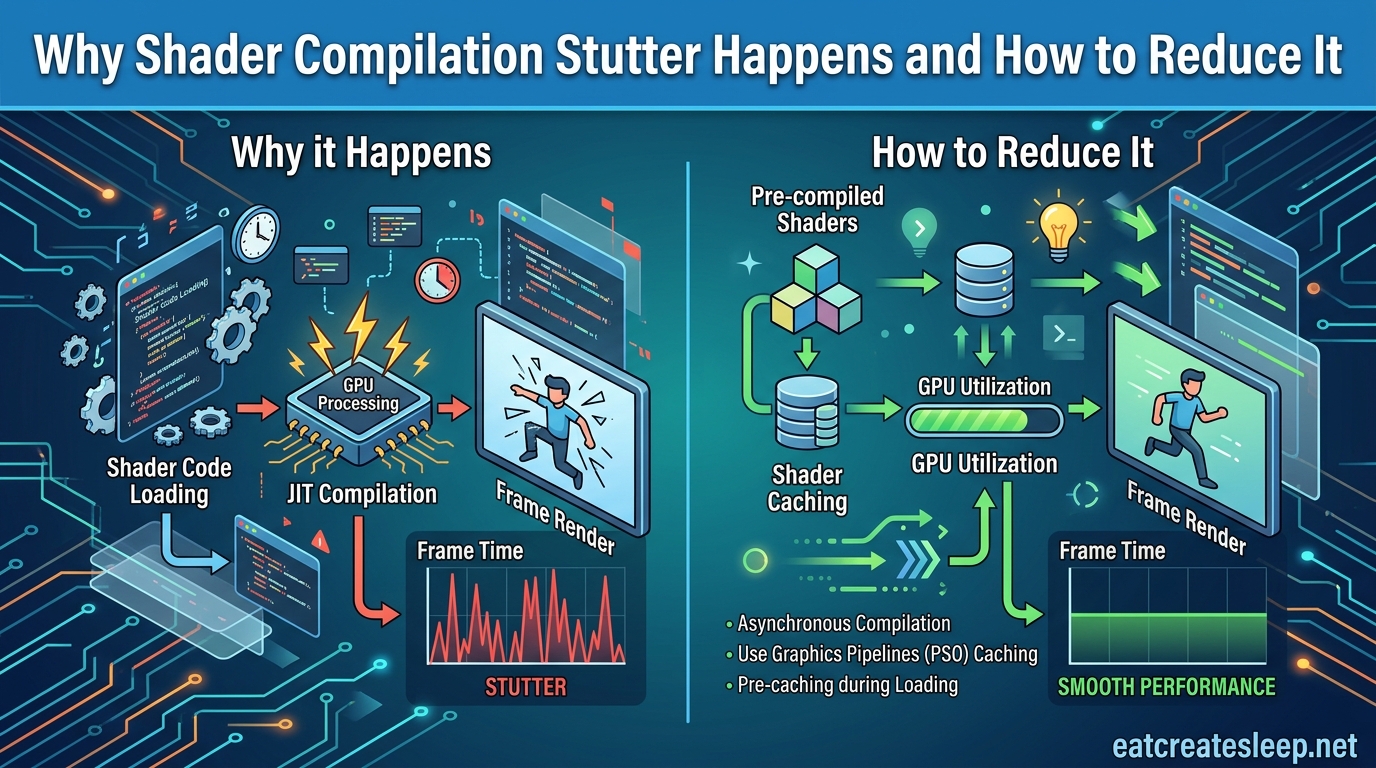
That translation step is called shader compilation. It is normally invisible because most engines cache the result on disk so the work only happens once. The stutter you feel is the cost of that first-time compilation happening during gameplay instead of beforehand.
Why Shader Compilation Stutter Happens
Shader compilation stutter happens because the GPU cannot render a frame with a shader until that shader has finished compiling. When a new effect appears on screen and the shader is not yet built, the engine has two bad choices: stall the frame until the compile finishes, or skip the effect and try again next frame.
Most engines choose to stall. A single shader compile can take anywhere from a few milliseconds to several hundred milliseconds, depending on complexity. During that window, the CPU thread doing the compile is fully blocked, the frame time spikes, and you see a visible hitch.
The reason the problem is so visible in modern games is the move to just-in-time compilation. Older engines pre-built most of their shaders during a loading screen or a dedicated pre-compilation pass. Newer engines, especially those targeting DirectX 12 and Vulkan, build Pipeline State Objects (PSOs) on demand as the renderer encounters new material and lighting combinations.
Each PSO bundles a vertex shader, pixel shader, and other render state into one compiled unit. The catch is that the number of possible PSO combinations can explode quickly. A game with ray tracing, dynamic weather, and dozens of material types can generate tens of thousands of unique pipelines, far more than the developer could ever pre-build at launch.
The stutter pattern is unmistakable once you know what to look for. The first time you walk into a new area, swing a new weapon, or trigger a cutscene, you get a cluster of hitches. Replay the same scene an hour later and it is perfectly smooth because the compiled shaders are now sitting in the shader cache.
This is also why shader stutter is sometimes called first-run stutter. It tends to fade over a playthrough as the cache fills up, then comes roaring back after a driver update, a game patch, or a hardware change that invalidates the existing cache.
DX11 vs DX12: Why Modern APIs Stutter More
If you have ever noticed that older DirectX 11 games rarely stutter on first launch while newer DirectX 12 titles do, you are not imagining it. The two APIs handle shader compilation very differently.
Under DX11, the driver does most of the heavy lifting. When a game creates a shader, the NVIDIA or AMD driver is allowed to thread and schedule the compile work however it sees fit. Many drivers aggressively pre-compile shaders in the background and even maintain their own internal shader cache that persists across games.
Under DX12, that responsibility shifts to the game engine itself. DX12 is a low-level API designed to give developers more control and less overhead, but that control comes with a cost. The engine must explicitly create every Pipeline State Object, and there is no driver safety net quietly finishing the work ahead of time.
The trade-off looks roughly like this:
- DX11: Higher per-draw CPU overhead, but the driver handles shader compilation behind the scenes and pre-caches aggressively.
- DX12: Lower CPU overhead and better multi-threading, but the engine is responsible for PSO creation and any pre-compilation pass.
- DX11: Stutter is rare because the driver front-loads compile work.
- DX12: Stutter is common because engines often build PSOs lazily, the first time a material or effect is needed.
- DX11: Driver updates can break things, but shader caches usually survive.
- DX12: Engine-level PSO caching is more fragile and easier to invalidate.
None of this means DX12 is worse. In steady state, DX12 can deliver lower latency and better frame pacing than DX11 ever could. The pain is concentrated in that first-run window before the cache is warm.
Games and Engines Commonly Affected
Some games have become infamous for shader compilation stutter. The pattern repeats across engines, but a few names come up over and over in forum threads.
Elden Ring shipped with severe stutter on PC, mostly tied to its DirectX 12 implementation. Many players reported that the open world felt rough for the first hour or two, then smoothed out as the shader cache filled.
Starfield had similar first-run issues at launch, with hitches appearing when new particle effects, lighting states, or material combinations appeared for the first time.
Hogwarts Legacy shipped an explicit shader pre-compilation screen on launch, which is now considered best practice. Even with that screen, players still saw residual stutter as the engine built pipelines the pre-pass had missed.
Cyberpunk 2077 became a poster child after its next-gen patch moved it firmly onto DX12. Path tracing in particular introduced a huge number of new PSO combinations, which is why the stutter often returns when ray tracing settings change.
Call of Duty titles on PC have also shown shader stutter spikes, especially after major patches that introduce new weapon effects or map geometry.
At the engine level, Unreal Engine 4 and Unreal Engine 5 are the most commonly cited culprits. UE4’s DX12 path shipped with well-documented PSO issues, and UE5 titles like The Callisto Protocol and Dead Space Remake carried those problems forward. Epic has shipped PSO caching tools, but they require developers to actually capture and ship a PSO cache with the game, which many studios skip.
Custom engines are not immune either. Path of Exile 2 famously recompiles shaders every time you log in, and players have released community mods for Final Fantasy VII Remake and Rebirth that fully solve shader stutter the official builds still ship with.
How to Reduce Shader Compilation Stutter
You cannot eliminate shader compilation stutter through hardware alone. Even an RTX 4090 with a Gen5 SSD feels it. What you can do is shrink the hitches, accelerate the cache warm-up, and avoid the most common mistakes that make the problem worse. Here are the fixes our team found consistently worth the effort.
1. Let the Pre-Compilation Screen Finish (Impact: High, Effort: Easy)
Many modern games, including Hogwarts Legacy, The Last of Us Part II, and several UE5 titles, show a shader pre-compilation progress bar on first launch. The single most important thing you can do is let it run to completion without alt-tabbing, without skipping, and without forcing the game into the main menu early.
That screen is doing the work the engine should have done before you started playing. Interrupting it forces those shaders to compile later, during gameplay, which is exactly the stutter you are trying to avoid.
2. Enable and Enlarge the GPU Shader Cache (Impact: High, Effort: Easy)
Both NVIDIA and AMD expose a shader cache size setting in their control panels. On NVIDIA, look under Global Settings for Shader Cache Size and set it to at least 10 GB, or 100 GB if you play many modern titles. On AMD, the equivalent setting lives under Graphics, Advanced, Shader Cache.
A larger cache means shaders from older games survive longer before being evicted. This matters because every driver update can invalidate part of the cache, and you want to minimize how often a game has to rebuild its shaders from scratch.
3. Keep Your GPU Driver Current, but Not Bleeding-Edge (Impact: Medium, Effort: Easy)
Driver updates fix shader compilation bugs regularly, so staying current matters. But every major driver release can invalidate the existing shader cache, which means a fresh wave of first-run stutter across your library.
The practical compromise most PC gamers land on is to update on stable branches, skip the beta channel unless a specific game has a known fix, and accept a small re-stutter period after each upgrade as the cache refills.
4. Use Steam Shader Pre-Caching (Impact: Medium, Effort: Easy)
If you buy games on Steam, enable Steam Shader Pre-Caching in Settings, Downloads. Valve compiles shaders for common GPU and driver combinations in the cloud and ships them to your machine before you ever launch the game. This is the same approach that makes the Steam Deck feel so smooth.
For games Valve has pre-cached, the first launch can be nearly stutter-free. For games that are not covered, you fall back to local compilation. Either way, leaving the feature on costs you nothing.
5. Cap Your Frame Rate During the Warmup Period (Impact: Medium, Effort: Easy)
When you are still filling the shader cache, the engine is doing extra CPU work that throws off frame pacing. Capping the frame rate, either in-game or through RivaTuner Statistics Server, gives the compiler more headroom and reduces the perceived severity of each hitch.
Try setting a 60 FPS cap for the first session, then lifting it once the cache has filled. You will often find that 1% lows improve significantly even though the average framerate looks lower on paper.
6. Install the Game on an SSD (Impact: Medium, Effort: Medium)
An SSD does not directly speed up shader compilation, which is CPU-bound. What it does is dramatically reduce the time the engine spends loading shader cache files from disk and streaming assets in parallel with the compile work.
A Gen3 NVMe SSD is usually enough. The jump from HDD to SSD is enormous; the jump from SSD to Gen5 NVMe is small for shader stutter specifically.
7. Try DX11 Mode Where Available (Impact: High, Effort: Easy)
Some games still ship with a DirectX 11 executable or a launch option that forces DX11. Because the DX11 driver front-loads shader compilation, switching can massively reduce first-run stutter. The trade-off is that you lose DX12-only features like ray tracing and may see slightly lower peak frame rates.
This is a workaround, not a fix. But for games where the DX12 path is genuinely broken, it can turn an unplayable experience into a smooth one.
8. Look for Community Shader Mods (Impact: Variable, Effort: Medium)
For some games, the community has done what the developer did not. The Final Fantasy VII Remake and Rebirth mods that fully solve shader stutter are the most famous example. Similar patches exist for several UE4 titles.
Check Nexus Mods and the relevant game subreddit before writing a title off. If a community fix exists, it usually ships a pre-built PSO cache that bypasses runtime compilation entirely.
9. Close Background Apps That Compete for CPU (Impact: Low-Medium, Effort: Easy)
Shader compilation is CPU-bound, often on a single thread. Anything else hammering your CPU during gameplay, whether that is a browser with dozens of tabs, a streaming tool, or a heavy antivirus scan, directly worsens the stutter.
Before a first playthrough of a shader-heavy game, close everything non-essential. The difference is subtle but real, especially on six-core CPUs.
How to Diagnose Whether Your Stutter Is Actually Shader Compilation
Not every stutter is shader stutter. Traversal stutter, asset streaming stutter, CPU bottlenecks, and driver bugs can all feel similar in the moment. Treating the wrong cause wastes time and money.
The defining signature of shader compilation stutter is that it happens once, in a specific spot, and then never again in that same spot on a replay. If the hitch repeats every time you walk through the same doorway, it is almost certainly not shader stutter.
Here is a quick diagnostic checklist our team uses:
- Shader compilation stutter: First-time only, fades over the session, returns after driver or game updates.
- Traversal stutter: Happens when moving quickly through the world, repeats every pass, common in Unreal Engine titles regardless of cache state.
- Asset streaming stutter: Tied to storage speed, worse on HDDs, repeats when the same assets load again, improves with faster SSDs.
- CPU bottleneck: Scales with scene complexity, shows up in CPU-bound benchmarks, does not fade over a playthrough.
- Driver issue: Often paired with graphical artifacts, fixed by a clean driver reinstall, sometimes triggered by a specific driver version.
To confirm shader stutter, capture a frame time graph using MSI Afterburner, CapFrameX, or NVIDIA Frame View. Look for isolated spikes that appear once and then vanish. Those isolated, single-occurrence spikes, especially clustered during first exposure to new effects, are your smoking gun.
Pay attention to 1% lows rather than average frame rate. A game can average 120 FPS and still feel awful if the 1% low drops to 25 FPS during shader compiles. That gap between average and 1% low is the most honest measure of how bad the stutter actually is.
The 2026 Outlook: Microsoft Advanced Shader Delivery
The most promising long-term fix is not something you can download today. It is an industry initiative called Advanced Shader Delivery, driven by Microsoft with backing from NVIDIA, AMD, and Intel.
The idea is to standardize how shader programs are compiled and shared across the PC ecosystem, so that shaders can be pre-built once and distributed to players the same way game assets are distributed today. Think of it as Steam Shader Pre-Caching, but baked into the operating system and driver layer rather than tied to one storefront.
For 2026, the program is still in early stages. Engine and driver support is rolling out gradually, and the biggest impact will land once Windows and the major GPU vendors ship it as a default rather than an opt-in feature. Forum sentiment across r/pcgaming treats this as the first credible path to actually killing shader stutter at the platform level, rather than patching around it per game.
Until then, the practical playbook is the one above: keep drivers current, enlarge the shader cache, let pre-compilation finish, and lean on Steam’s pre-caching where it is available. Ray tracing will keep raising the stakes on PSO variety, so the manual fixes stay relevant even as Microsoft’s work matures.
Frequently Asked Questions
How to fix shader compilation stutter?
To reduce shader compilation stutter, let any pre-compilation screen finish on first launch, enlarge your GPU shader cache in the NVIDIA or AMD control panel, enable Steam Shader Pre-Caching, keep your driver on a current stable branch, cap your frame rate during the warmup session, and install the game on an SSD. For DX12 titles that are severely affected, switching to DX11 mode where available can dramatically reduce first-run stutter.
How to fix shader compilation failure?
Shader compilation failure usually points to a corrupt shader cache or a driver bug. Run a clean driver reinstall using DDU (Display Driver Uninstaller), delete the shader cache folder for the affected game, verify game files through Steam or your launcher, and update to the latest stable GPU driver. If the error persists, the game itself may need a patch.
How to make shaders less laggy?
To make shaders feel less laggy, enable Steam Shader Pre-Caching, set the GPU shader cache size to at least 10 GB, close background CPU-heavy apps during the first session, cap your frame rate to give the compiler headroom, and install the game on an SSD so shader cache files load faster. Community shader mods can also eliminate runtime compilation for some titles.
How to make shader compilation faster?
Shader compilation is CPU-bound and single-threaded in most engines, so a CPU with strong single-core performance compiles faster. Enlarging the shader cache avoids recompiles, Steam pre-caching skips local compilation entirely for supported games, and disabling unnecessary background apps frees up CPU cycles. Upgrading from an HDD to an SSD also speeds up how fast compiled shader cache files are written and read back.
Conclusion
Shader compilation stutter is not a hardware problem, and throwing money at a faster GPU will not solve it. It is an architectural side effect of how modern graphics APIs like DirectX 12 and Vulkan build Pipeline State Objects on demand, the first time your machine encounters a new visual effect.
The good news is that the playbook is now well understood. Let pre-compilation screens finish, enlarge your shader cache, lean on Steam Shader Pre-Caching, keep drivers on a stable branch, cap your frame rate during the warmup window, and install games on an SSD. For badly behaved DX12 titles, a DX11 fallback or a community shader mod can rescue an otherwise unplayable game.
Looking ahead, Microsoft’s Advanced Shader Delivery initiative, backed by NVIDIA, AMD, and Intel, is the first credible platform-level fix on the horizon. Until it ships broadly, the manual fixes above are how you reduce shader compilation stutter and reclaim a smooth first playthrough.